What is an IP Address?
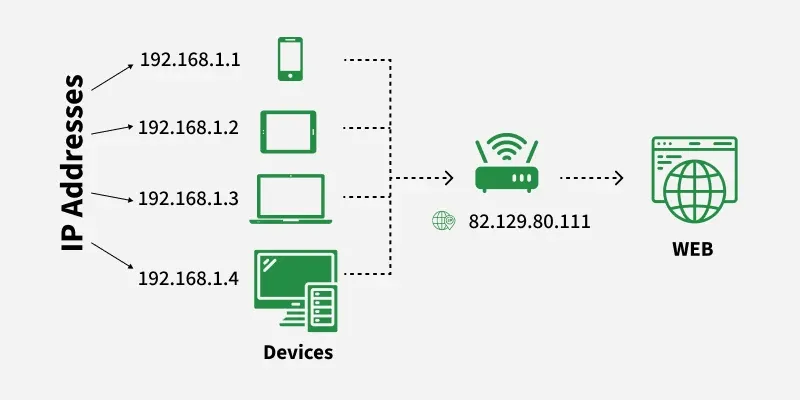
An IP address (Internet Protocol address) is a unique number assigned to each device connected to a network. It allows devices to communicate with each other over the internet. There are two main types of IP addresses: IPv4 and IPv6.
IPv4 vs. IPv6
- IPv4: It consists of four sets of numbers, like 192.168.1.1. This format supports about 4.3 billion unique addresses.
- IPv6: This newer version uses longer hexadecimal numbers. It supports a significantly larger number of devices, up to 340 undecillion addresses!
Why Do We Need IP Addresses?
IP addresses serve several critical functions:
- Device Identification: Each device needs a unique address to be identified on the network.
- Location Addressing: IP addresses help in locating devices, similar to how street addresses help find homes.
- Routing: IP addresses allow data to be sent from one device to another without confusion.
How IP Addresses Work
When you connect to the internet, your Internet Service Provider (ISP) assigns an IP address to you. It can be static (permanent) or dynamic (changing). Here’s a simple breakdown:
Static IP Address
- Remains constant.
- Easier for remote access.
- Often used by servers hosting websites.
Dynamic IP Address
- Changes periodically.
- More cost-effective.
- Provides better security.
How to Find Your IP Address
Finding your IP address is simple.
For Windows:
- Open Command Prompt.
- Type
ipconfig. - Look for “IPv4 Address.”
For macOS:
- Open Terminal.
- Type
ifconfig. - Check the interface details.
For Smartphones:
- iOS: Go to Settings → Wi-Fi → Tap on the network name.
- Android: Go to Settings → Network & Internet → Tap on your Wi-Fi network.
Common Uses of IP Addresses
IP addresses are not just for identification. They have diverse uses:
- Web Hosting: Servers use IP addresses to host websites and manage traffic.
- Remote Access: Businesses use static IPs for secure access to internal networks.
- Geolocation: IP addresses can be used to determine a user’s location.
IP Address Security
Security is crucial when dealing with IP addresses. Here are tips to keep your device safe:
- Use a VPN: A Virtual Private Network hides your IP address, enhancing security.
- Regularly Update Software: Keep applications and systems updated to fix vulnerabilities.
- Enable a Firewall: Firewalls help block unauthorized access to your network.
Conclusion
Understanding your IP address is vital for navigating the internet securely and effectively. With the rise of devices connected to the web, knowledge of IP addresses is increasingly important.